<p align="center">
<a href="#">
<img alt="ffmpeg.wasm" width="128px" height="128px" src="https://github.com/ffmpegwasm/ffmpeg.wasm/raw/master/docs/images/ffmpegwasm-icon.png">
</a>
</p>
# ffmpeg.wasm
[](https://github.com/emersion/stability-badges#experimental)
[](https://img.shields.io/node/v/@ffmpeg/ffmpeg.svg)
[](https://github.com/ffmpegwasm/ffmpeg.wasm/actions)


[](https://github.com/ffmpegwasm/ffmpeg.wasm/graphs/commit-activity)
[](https://opensource.org/licenses/MIT)
[](https://github.com/airbnb/javascript)
[](https://www.npmjs.com/package/@ffmpeg/ffmpeg)
[](https://www.npmjs.com/package/@ffmpeg/ffmpeg)
Join us on Discord!
[](https://discord.gg/NjGMaqqfm5)
ffmpeg.wasm is a pure Webassembly / Javascript port of FFmpeg. It enables video & audio record, convert and stream right inside browsers.
**AVI to MP4 Demo**
<p align="center">
<a href="#">
<img alt="transcode-demo" src="https://github.com/ffmpegwasm/ffmpeg.wasm/raw/master/docs/images/transcode.gif">
</a>
</p>
Try it: [https://ffmpegwasm.netlify.app](https://ffmpegwasm.netlify.app#demo)
Check next steps of ffmpeg.wasm [HERE](https://github.com/ffmpegwasm/ffmpeg.wasm/discussions/415)
## Installation
**Node**
```
$ npm install @ffmpeg/ffmpeg @ffmpeg/core
```
> As we are using experimental features, you need to add flags to run in Node.js
```
$ node --experimental-wasm-threads transcode.js
```
**Browser**
Or, using a script tag in the browser (only works in some browsers, see list below):
> SharedArrayBuffer is only available to pages that are [cross-origin isolated](https://developer.chrome.com/blog/enabling-shared-array-buffer/#cross-origin-isolation). So you need to host [your own server](https://github.com/ffmpegwasm/ffmpegwasm.github.io/blob/main/server/server.js) with `Cross-Origin-Embedder-Policy: require-corp` and `Cross-Origin-Opener-Policy: same-origin` headers to use ffmpeg.wasm.
```html
<script src="static/js/ffmpeg.min.js"></script>
<script>
const { createFFmpeg } = FFmpeg;
...
</script>
```
> Only browsers with SharedArrayBuffer support can use ffmpeg.wasm, you can check [HERE](https://caniuse.com/sharedarraybuffer) for the complete list.
## Usage
ffmpeg.wasm provides simple to use APIs, to transcode a video you only need few lines of code:
```javascript
import { writeFile } from 'fs/promises';
import { createFFmpeg, fetchFile } from '@ffmpeg/ffmpeg';
const ffmpeg = createFFmpeg({ log: true });
(async () => {
await ffmpeg.load();
ffmpeg.FS('writeFile', 'test.avi', await fetchFile('./test.avi'));
await ffmpeg.run('-i', 'test.avi', 'test.mp4');
await fs.promises.writeFile('./test.mp4', ffmpeg.FS('readFile', 'test.mp4'));
process.exit(0);
})();
```
### Use other version of ffmpeg.wasm-core / @ffmpeg/core
For each version of ffmpeg.wasm, there is a default version of @ffmpeg/core (you can find it in **devDependencies** section of [package.json](https://github.com/ffmpegwasm/ffmpeg.wasm/blob/master/package.json)), but sometimes you may need to use newer version of @ffmpeg/core to use the latest/experimental features.
**Node**
Just install the specific version you need:
```bash
$ npm install @ffmpeg/core@latest
```
Or use your own version with customized path
```javascript
const ffmpeg = createFFmpeg({
corePath: '../../../src/ffmpeg-core.js',
});
```
**Browser**
```javascript
const ffmpeg = createFFmpeg({
corePath: 'static/js/ffmpeg-core.js',
});
```
Keep in mind that for compatibility with webworkers and nodejs this will default to a local path, so it will attempt to look for `'static/js/ffmpeg.core.js'` locally, often resulting in a local resource error. If you wish to use a core version hosted on your own domain, you might reference it relatively like this:
```javascript
const ffmpeg = createFFmpeg({
corePath: new URL('static/js/ffmpeg-core.js', document.location).href,
});
```
For the list available versions and their changelog, please check: https://github.com/ffmpegwasm/ffmpeg.wasm-core/releases
### Use single thread version
```javascript
const ffmpeg = createFFmpeg({
mainName: 'main',
corePath: 'https://unpkg.com/@ffmpeg/core-st@0.11.1/dist/ffmpeg-core.js',
});
```
## Multi-threading
Multi-threading need to be configured per external libraries, only following libraries supports it now:
### x264
Run it multi-threading mode by default, no need to pass any arguments.
### libvpx / webm
Need to pass `-row-mt 1`, but can only use one thread to help, can speed up around 30%
## Documentation
- [API](https://github.com/ffmpegwasm/ffmpeg.wasm/blob/master/docs/api.md)
- [Supported External Libraries](https://github.com/ffmpegwasm/ffmpeg.wasm-core#configuration)
## FAQ
### What is the license of ffmpeg.wasm?
There are two components inside ffmpeg.wasm:
- @ffmpeg/ffmpeg (https://github.com/ffmpegwasm/ffmpeg.wasm)
- @ffmpeg/core (https://github.com/ffmpegwasm/ffmpeg.wasm-core)
@ffmpeg/core contains WebAssembly code which is transpiled from original FFmpeg C code with minor modifications, but overall it still following the same licenses as FFmpeg and its external libraries (as each external libraries might have its own license).
@ffmpeg/ffmpeg contains kind of a wrapper to handle the complexity of loading core and calling low-level APIs. It is a small code base and under MIT license.
### Can I use ffmpeg.wasm in Firefox?
Yes, but only for Firefox 79+ with proper header in both client and server, visit https://ffmpegwasm.netlify.app to try whether your Firefox works.
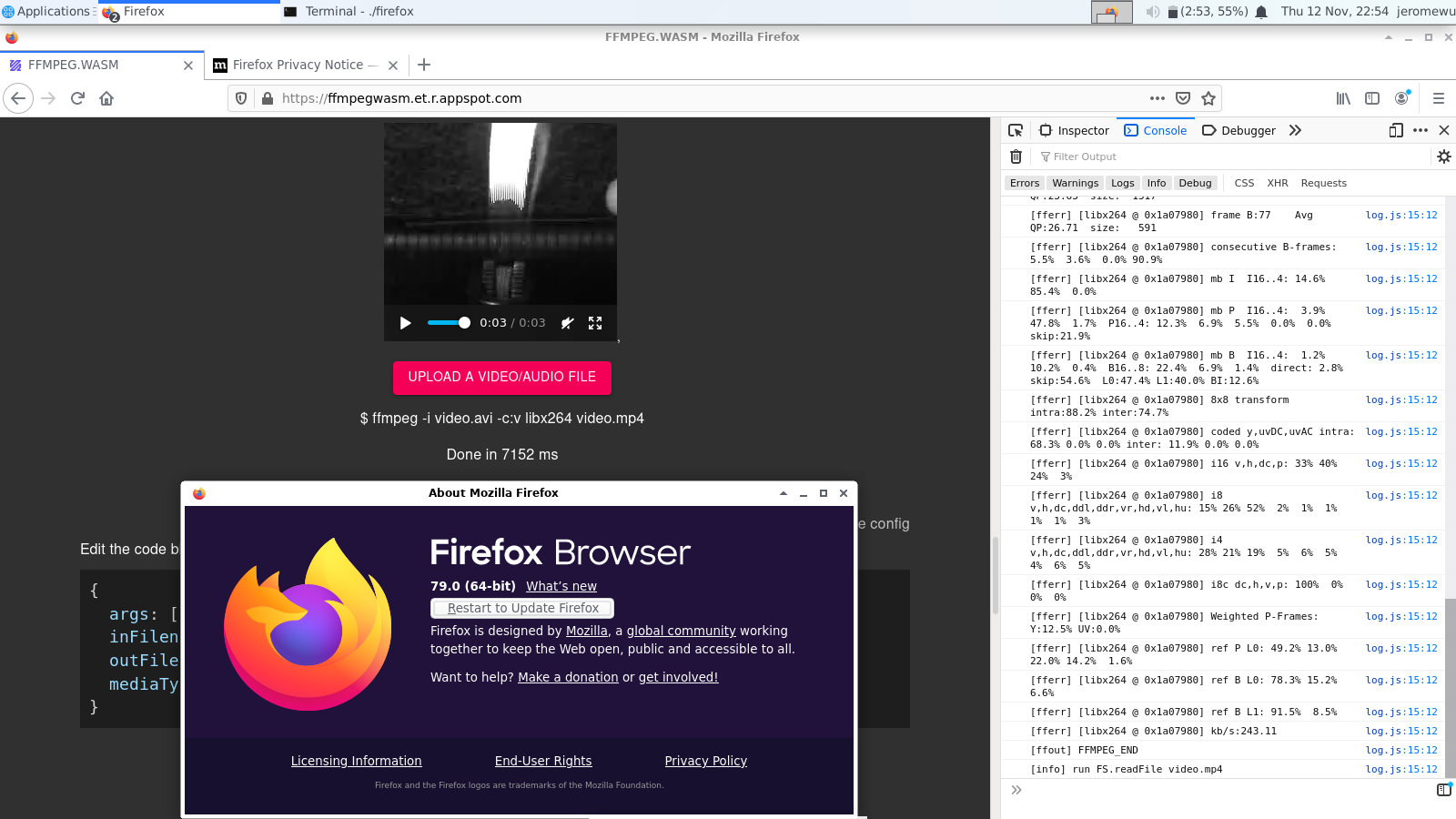
For more details: https://github.com/ffmpegwasm/ffmpeg.wasm/issues/106
### What is the maximum size of input file?
2 GB, which is a hard limit in WebAssembly. Might become 4 GB in the future.
### How can I build my own ffmpeg.wasm?
In fact, it is ffmpeg.wasm-core most people would like to build.
To build on your own, you can check build.sh inside https://github.com/ffmpegwasm/ffmpeg.wasm-core repository.
Also you can check this series of posts to learn more fundamental concepts:
- https://jeromewu.github.io/build-ffmpeg-webassembly-version-part-1-preparation/
- https://jeromewu.github.io/build-ffmpeg-webassembly-version-part-2-compile-with-emscripten/
- https://jeromewu.github.io/build-ffmpeg-webassembly-version-part-3-v0.1/
- https://jeromewu.github.io/build-ffmpeg-webassembly-version-part-4-v0.2/
### Why it doesn't work in my local environment?
When calling `ffmpeg.load()`, by default it looks for `http://localhost:3000/node_modules/@ffmpeg/core/dist/` to download essential files (ffmpeg-core.js, ffmpeg-core.wasm, ffmpeg-core.worker.js). It is necessary to make sure you have those files served there.
If you have those files serving in other location, you can rewrite the default behavior when calling `createFFmpeg()`:
```javascript
const { createFFmpeg } = FFmpeg;
const ffmpeg = createFFmpeg({
corePath: "http://localhost:3000/public/ffmpeg-core.js",
// Use public address if you don't want to host your own.
// corePath: 'https://unpkg.com/@ffmpeg/core@0.10.0/dist/ffmpeg-core.js'
log: true,
});
```